Airpods & Earbuds (Unboxed)
  Camera & Lenses (Unboxed)
  Headphones (Unboxed)
  Laptops (Unboxed)
  MacBooks (Unboxed)
  Mobile Accessories (Unboxed)
  Monitors (Unboxed)
  Wearables (Unboxed)
  Laptops (Grade A)
  Monitors (Grade A)
  Smartphone (Grade A)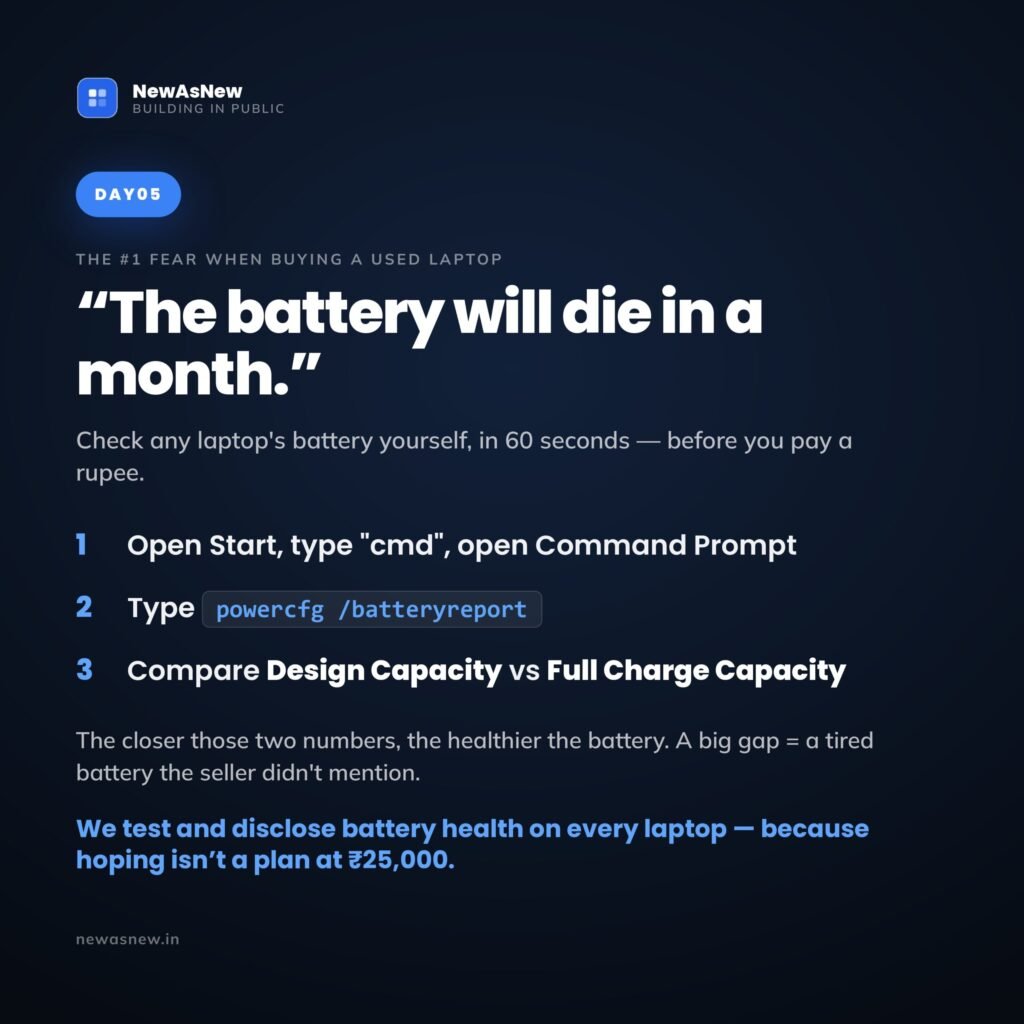
Short answer: On Windows, open Command Prompt, run powercfg /batteryreport, open the HTML file it saves, and compare DESIGN CAPACITY with FULL CHARGE CAPACITY. Full charge divided by design capacity is the battery’s real health percentage. Above 80% is healthy for a used laptop. Ask any seller for that number in writing before you pay — on the Dell Latitude 5400 (Core i5, 8th Gen) at ₹22,990 we publish the tested figure on the listing.
Prices are live as of 29 September 2026 and move with stock — check the linked product page for today’s exact price.
What “Excellent” battery health means here: above 80% of original design capacity on a laptop, and above 85% on a smartphone. The thresholds differ because the two age differently — a laptop spends most of its life on mains power, a phone is cycled every day. Anything below that is not listed; there is no lower battery tier. The measured figure for your exact unit is printed on its product page.
On a used laptop most parts either work or they do not. The screen is fine or it is not. The processor is what the sticker says. The battery is different: it degrades quietly, it cannot be judged from a photograph, and it is the one component where a seller can be technically truthful and still leave you with a laptop chained to a wall socket.
A lithium-ion battery does not fail suddenly — it shrinks. It was built to hold a certain amount of energy, and every charge cycle takes a little of that capacity away permanently. After a few years of corporate use a battery might hold most of its original capacity or well under half, and the laptop behaves identically in both cases until you unplug it. That is why “battery is good” is not information. Only a number is.
The good news: the laptop already knows the answer and will tell you for free.
The 60-second Windows check: powercfg /batteryreport

Windows has a built-in battery reporting tool. Nothing to install, no administrator rights needed.
- Click Start and type cmd.
- Open Command Prompt.
- Type
powercfg /batteryreportand press Enter. - Windows replies with the path where it saved the file — usually
C:\Users\YourName\battery-report.html. - Open that battery-report.html file. It opens in your browser like a web page.
- Scroll to the Installed batteries section near the top.
In that section you want two lines and can ignore everything else:
- DESIGN CAPACITY — how much energy the battery held when it left the factory. This never changes.
- FULL CHARGE CAPACITY — how much it can hold today at 100% charge. This falls over the battery’s life.
Battery health is one divided by the other:
Full charge capacity ÷ design capacity × 100 = battery health %
An example of the arithmetic, using round numbers to show the method: a design capacity of 60,000 mWh with a full charge capacity of 51,000 mWh gives 51,000 ÷ 60,000 = 0.85, so the battery is at 85% health. Real-world runtime will be roughly 85% of what that laptop managed when new.
The units are usually mWh, sometimes Wh. It does not matter which, as long as both figures use the same unit — the ratio is what you want.
What the percentage means day to day
| Health reading | What it means | What to do |
|---|---|---|
| 90% and above | Excellent. Runtime close to new. Common on Unboxed and lightly used units. | Buy with confidence. |
| 80–90% | Good, and normal for a well-kept ex-corporate laptop a few years old. You lose some runtime, not usability. | Fine. The realistic range for Grade A Certified stock. |
| 70–80% | Noticeably worn. Fine plugged in; unplugged runtime will feel short. | Acceptable at a lower price, or if you work at a desk. |
| Below 70% | Worn out. Treat it as a desk machine until the battery is replaced. | Get it replaced before purchase, or walk away. |
| Seller will not say | The most useful answer of all — they either did not check, or they did and would rather you did not know. | Walk away, whatever the discount. |
Hold on to one thing: a battery at 85% is not a defect. It is a used battery behaving exactly as physics says it should. What matters is that you knew the number before you paid. We go deeper into what a given percentage feels like in laptop battery health explained: what 80% actually means day to day.
Cycle count: the second number worth reading
While the report is open, scroll further down. Windows logs the battery’s usage history and recent capacity trend, and on many machines you can see the cycle count reported by the hardware.
A charge cycle is one full discharge worth of use, however it accumulates — two half-discharges count as one. Manufacturers design batteries around a rated cycle life, so a battery that has used only a fraction of its rated cycles has more life ahead than one near the end, even if today’s percentage looks similar. Health tells you where the battery is now; cycle count hints at how much road is left.
How to check battery health on a Mac
Apple makes this easier. On recent macOS versions: Apple menu → System Settings → Battery → Battery Health. You get a condition — typically “Normal” or “Service Recommended” — and a maximum capacity percentage, which is the same design-versus-current ratio worked out for you.
For the cycle count, hold Option and click the Apple logo, choose System Information, then open Power. It lists Cycle Count and Condition together. If you are weighing a used MacBook, read our MacBook buying guide for 2026 first — battery condition changes the value calculation more on Apple machines, because replacement is neither cheap nor a home job.
What to ask if you cannot run the test yourself
Buying online, you often cannot run the command before paying. So ask instead, and ask precisely — vague questions get vague answers.
| Ask this | A good answer sounds like | A bad answer sounds like |
|---|---|---|
| What is the tested battery health percentage on this exact unit? | A specific number, or a screenshot of the battery report | “Battery is good”, “full backup”, “no issue” |
| Do you test every unit, or a sample? | Every unit, as part of a defined inspection checklist | Silence, or a change of subject |
| Is the battery covered by the warranty? | A clear yes or no, with the period in writing | “Warranty hai” with no document |
| Can you send a photo of this unit with the report on screen? | Yes, within a few minutes | Catalogue images only; request ignored |
If a seller dodges the first question, stop there. Everything else you were told is now worth less, because you have learned how they answer questions. The same principle runs through the 15 questions to ask before buying any refurbished laptop and how to buy a refurbished laptop in India without getting cheated.
When a low reading should not stop you — and when it should
A worn battery is not always a dealbreaker. If you work at a desk, always plugged in, and the price reflects the wear, a laptop at 75% health can be a sound buy. Batteries on most ex-corporate Dell Latitude and HP EliteBook models are replaceable service parts, and that serviceability is a real advantage of ex-corporate laptops.
Walk away regardless of the discount if:
- The seller will not give you a number. Not “the number is low” — will not give one at all.
- You need all-day unplugged runtime. If you work in cafés, on trains or across a campus, no price makes a worn battery fit your life. Insist on a high tested figure or buy Unboxed.
- The report shows a full charge capacity far below design, and the laptop is priced as though it were healthy. You are paying for a component already used up.
- The battery is swollen, the trackpad sits unevenly, or the base will not lie flat. Stop. That is a safety matter. Do not buy it and do not charge it.
Laptops in stock right now, with tested batteries

Battery capacity is one of the points inside our 50-point inspection, and the tested figure goes on the product page rather than into a conversation you have to start. If a unit’s battery does not meet our standard we replace it or we do not list the laptop — see how our 50-point quality check actually works.
- Dell Latitude 7490 (Core i5, 8th Gen) — Grade A Certified — ₹22,490, 75% off MRP ₹88,999. Windows 11 eligible.
- Dell Latitude 5400 (Core i5, 8th Gen) — Grade A Certified — ₹22,990, 76% off MRP ₹94,999. 8th Gen, so Windows 11 eligible.
- Dell Latitude 7400 (Core i5, 8th Gen) — Grade A Certified — ₹24,990, 74% off MRP ₹98,000. Lighter ultrabook chassis.
- HP EliteBook 840 G8 (Core i5, 11th Gen) — Grade A Certified — ₹34,990, 61% off MRP ₹89,999. Newer platform, newer battery.
Each ships with a written warranty, a GST invoice, 7-day returns and EMI. Run powercfg /batteryreport yourself the day it arrives — inside the 7-day window — and hold us to the figure we published. What the warranty covers is set out in refurbished laptop warranty in India.
Frequently asked questions
How do I check laptop battery health on Windows?
Open Command Prompt from the Start menu, type powercfg /batteryreport and press Enter. Windows saves an HTML file, usually at C:\Users\YourName\battery-report.html, and tells you the path. Open it in your browser and find the Installed batteries section. Compare DESIGN CAPACITY with FULL CHARGE CAPACITY — full charge divided by design capacity, times 100, is your real battery health percentage.
What do DESIGN CAPACITY and FULL CHARGE CAPACITY mean?
Design capacity is how much energy the battery held when manufactured, and it never changes. Full charge capacity is how much it holds today when charged to 100%, and it falls as the battery ages. The gap between them is the wear. For example, a design capacity of 60,000 mWh with a full charge capacity of 51,000 mWh works out to 85% health.
What is a good battery health percentage for a used laptop?
Above 80% is healthy and is the realistic range for a well-kept ex-corporate laptop a few years old. 90% and above is excellent, and more common on Unboxed units. Between 70% and 80% the wear is noticeable and should be reflected in the price. Below 70%, plan on replacing the battery or treat the laptop as desk-bound.
How do I check battery health on a Mac?
On recent macOS versions go to Apple menu, then System Settings, then Battery, then Battery Health, which shows the condition and a maximum capacity percentage. For the cycle count, hold the Option key while clicking the Apple logo, choose System Information, then open the Power section, which lists Cycle Count and Condition.
Does low battery health mean I should not buy the laptop?
Not automatically. If you work mainly at a desk on mains power and the price reflects the wear, a partly worn battery can be fine — especially on ex-corporate Dell and HP models where the battery is a replaceable service part. Walk away if the seller refuses to give a number, if you need all-day unplugged runtime, or if the laptop is priced as though the battery were healthy when it is not.
What should I do if a laptop battery looks swollen?
Stop using it and do not charge it. A swollen battery pushes the trackpad up, stops the base sitting flat, or makes the case creak. This is a safety issue rather than a value question — it needs professional replacement, and you should not buy a laptop in that condition at any discount.
Browse and ask
Ready to look at machines? Start with best refurbished laptops under ₹25,000. For keeping a battery healthy once you own it, read how to extend the life of your laptop.
Want the tested battery health on a specific unit before you spend a rupee? Message us on WhatsApp with the model name. We will send the measured figure from our inspection on the actual laptop in stock — or tell you straight that we do not have one we would put our name on.
Written by A Pandey, founder of NewAsNew (NextG Serve Pvt. Ltd., New Delhi). We measure battery capacity on every laptop as part of a 50-point inspection and publish the figure, because when you spend ₹25,000 you deserve facts rather than reassurance. Not every product deserves to be sold. Read why we started NewAsNew.