Airpods & Earbuds (Unboxed)
  Camera & Lenses (Unboxed)
  Headphones (Unboxed)
  Laptops (Unboxed)
  MacBooks (Unboxed)
  Mobile Accessories (Unboxed)
  Monitors (Unboxed)
  Wearables (Unboxed)
  Laptops (Grade A)
  Monitors (Grade A)
  Smartphone (Grade A)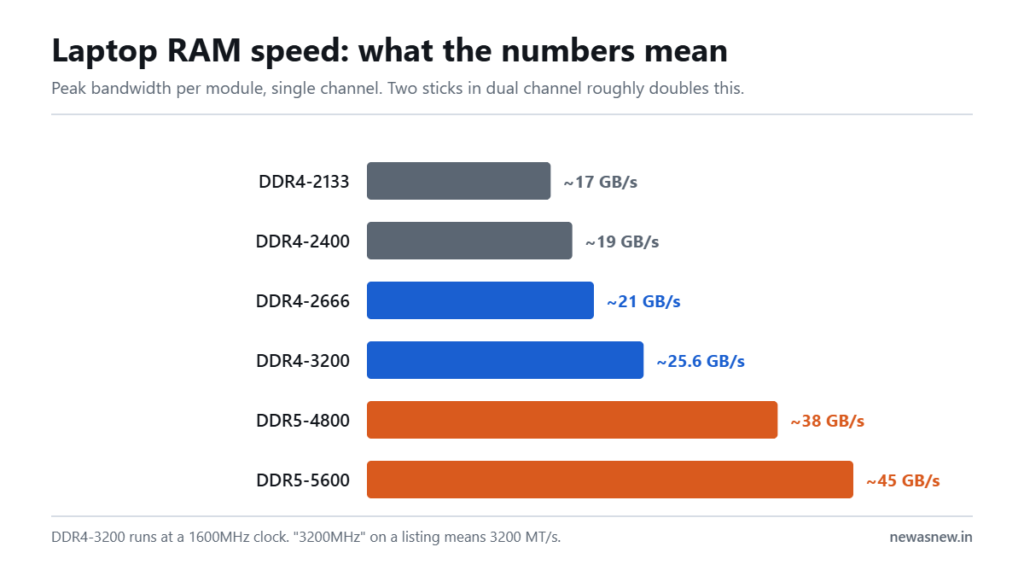
Short answer: Going from DDR4-2400 to DDR4-3200 is roughly a 33% jump in data rate but usually only a 3-8% gain in real work like Excel, Chrome or Tally. Two things matter far more: total capacity, and whether the laptop runs two sticks in dual channel. A dual-channel 16GB DDR4-2666 machine such as the HP EliteBook 840 G8 at Rs 32,990 will beat a single-stick 8GB DDR4-3200 machine in almost everything you actually do.
Prices are live as of 6 September 2026 and move with stock — check the linked product page for the current figure before you decide.
Why is 3200MHz not actually 3200MHz?
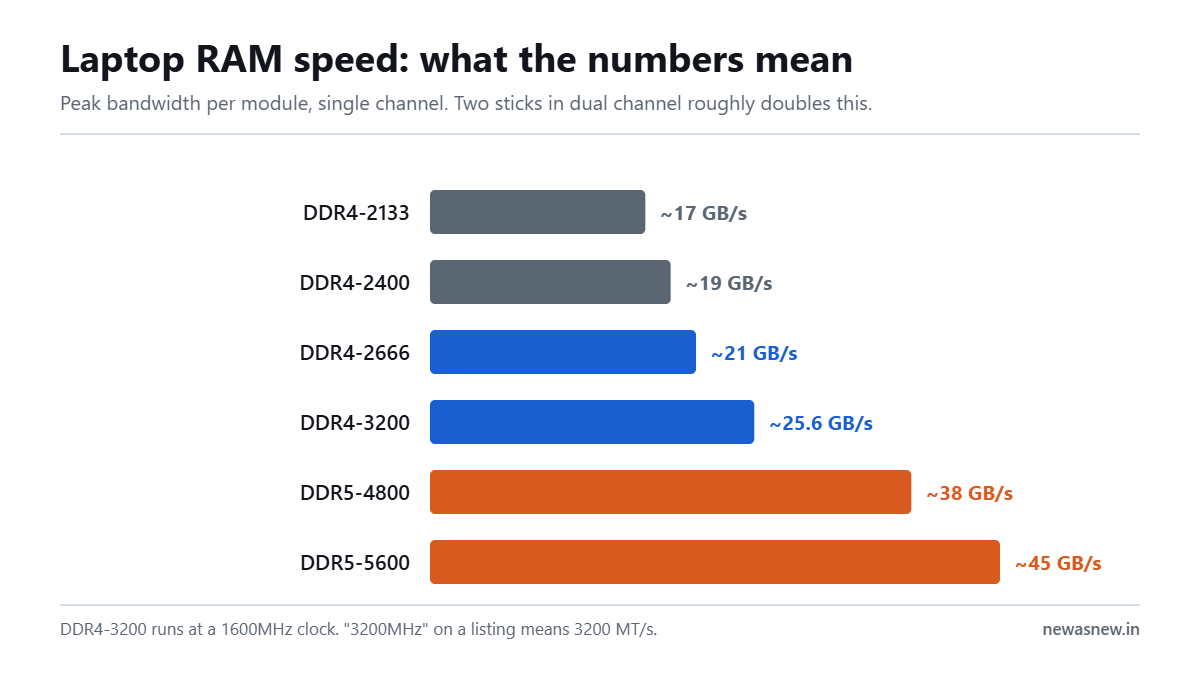
This is the piece nobody explains, so here it is plainly. DDR stands for Double Data Rate. The memory transfers data twice per clock cycle. So a stick sold as DDR4-3200 runs at an actual clock of 1600MHz and achieves 3200 mega-transfers per second, written MT/s.
The industry and every retail listing in India calls it 3200MHz anyway. It is technically wrong and universally used. You do not need to correct anyone — you just need to know that when two listings say 3200MHz and 3200 MT/s, they mean the same stick.
What do the different speeds actually mean in practice?
| Rating | Real clock | Peak bandwidth (single channel) | Where you find it |
|---|---|---|---|
| DDR4-2133 | 1066MHz | ~17 GB/s | Early 8th Gen machines |
| DDR4-2400 | 1200MHz | ~19 GB/s | Latitude 5400 / 7400 era |
| DDR4-2666 | 1333MHz | ~21 GB/s | Very common on 8th-10th Gen |
| DDR4-3200 | 1600MHz | ~25.6 GB/s | 10th-11th Gen business laptops |
| DDR5-4800 | 2400MHz | ~38 GB/s | 12th Gen and newer |
| DDR5-5600 | 2800MHz | ~45 GB/s | 13th Gen and newer |
Does faster RAM make my laptop feel faster?
Honestly: rarely, on its own. Here is where it shows up and where it does not.
You will not notice it in Word, Excel, Tally, Chrome, Zoom, Teams, VS Code, PDF work, accounting software, college assignments, or watching video. In independent testing these workloads typically move 3-8% between DDR4-2400 and DDR4-3200 — inside the range of normal variation between two boots of the same machine.
You will notice it if the laptop has no dedicated graphics card. Integrated graphics such as Intel UHD or Iris Xe have no memory of their own; they borrow the system RAM. Starve them of bandwidth and frame rates fall directly. This is the single biggest reason to care about RAM speed on a business laptop.
You will also notice it in large-file video encoding, big compilation jobs and heavy virtual machines — but if that is your work, capacity and CPU matter more than the speed rating anyway.
What is dual channel, and why does it beat speed?
Your CPU memory controller has two lanes to the RAM. One stick uses one lane. Two matched sticks use both, roughly doubling usable bandwidth.
The arithmetic is unkind to the speed upgrade. A single DDR4-3200 stick gives about 25.6 GB/s. Two DDR4-2666 sticks give about 42 GB/s. The slower pair wins by a wide margin, and on integrated graphics that gap is visible in every frame.
So the order of priority when you are buying, from most to least important:
- Enough capacity. 16GB in 2026 for real work; 8GB only for light study use.
- Two sticks, not one. Check this before you buy. It is free performance and most people never look.
- An SSD, and preferably NVMe. Bigger real-world impact than any RAM decision.
- Then, and only then, the speed rating.
How do I check my RAM speed and channel count?
Windows 11: press Ctrl+Shift+Esc for Task Manager, open the Performance tab, click Memory. It shows Speed in MT/s, Slots used (for example 2 of 2), and Form factor. If it says 1 of 2, you have a free slot and a cheap upgrade available.
For channel confirmation, the free tool CPU-Z shows Channel # as Single or Dual under the Memory tab. On a Mac, memory is unified and soldered — there is nothing to check or change.
Who should NOT pay extra for faster RAM
- Students and office users. Put the money into capacity or a bigger SSD. You will feel those every day and the speed rating never.
- Anyone with a dedicated graphics card. A discrete GPU carries its own VRAM, so system RAM speed matters far less to you.
- Anyone still on a mechanical hard disk. Fix that first. It is a bigger improvement than every RAM upgrade combined.
- Anyone buying a soldered-RAM ultrabook. The speed is whatever the factory chose and cannot change. Choose on capacity instead.
What we can ship today
Every unit below is in stock as this page was last checked, with a 6-month NewAsNew Assured Warranty, GST invoice, 7-day returns and no-cost EMI. If it is listed here, we can dispatch it.
| Model | Price | MRP | You save |
|---|---|---|---|
| Dell Latitude 7490 Intel Core i5 8th Gen Laptop · Business Series |
₹22,490 | ₹88,999 | 75% |
| Dell Latitude 5400 Core i7 8th Gen Laptop · Business Series |
₹25,990 | ₹79,999 | 68% |
| Dell Latitude 5310 2-in-1 Core i5 10th Gen Laptop · 360° Convertible · Business Series |
₹39,990 | ₹89,000 | 55% |
| Dell Precision 3551 Core i7 10th Gen Laptop · 4GB Graphics · Mobile Workstation |
₹54,990 | ₹149,999 | 63% |
Prices checked on 29 September 2026 — stock and prices move, so the linked product page is always the truth.
Browse all laptops in stock · Ask us on WhatsApp which one fits you
Frequently asked questions
Is 3200MHz RAM good for a laptop in 2026?
Yes. DDR4-3200 is the fastest common DDR4 speed and is comfortably adequate for every mainstream workload. If a refurbished laptop offers it, take it — just do not pay a large premium over DDR4-2666 to get it.
Can I mix a 2666 stick with a 3200 stick?
Yes, and it will work, but both will run at the slower speed — 2666. It is still worth doing, because two sticks at 2666 beat one stick at 3200 through dual channel.
What is the difference between MHz and MT/s?
MT/s counts data transfers per second; MHz counts clock cycles. DDR memory transfers twice per cycle, so DDR4-3200 means 3200 MT/s at a 1600MHz clock. Retail listings call it 3200MHz. Same product.
Does RAM speed affect gaming on a laptop?
On integrated graphics, substantially — bandwidth is directly tied to frame rate. On a laptop with a dedicated GPU, only marginally, because the GPU has its own dedicated memory.
Will faster RAM fix a slow laptop?
Almost never. A slow laptop in India is usually slow because of a mechanical hard disk, too little RAM in total, a thermally throttled CPU from dust-clogged fans, or background software. Fix those first, in that order.
How much RAM speed do I lose with a refurbished laptop?
Nothing inherent to being refurbished. A Latitude 5400 runs the same DDR4-2666 it shipped with in 2018. What varies is whether the previous owner left one stick or two in it, which is exactly what our 50-point check records before a unit is listed.
Related guides
- Best refurbished laptops in India 2026, by budget
- Intel Core i5 vs i7 in refurbished laptops
- 8th vs 10th vs 11th Gen: the real-world difference
- Why laptop prices are rising in India in 2026
Still deciding? Talk to a human
Send us the work you do and your budget on WhatsApp and we will tell you honestly whether we have something for you — or whether you should wait. Chat with NewAsNew on WhatsApp (+91 79822 35917).
Browse live stock: Grade A Certified laptops · Refurbished iPhones · Unboxed headphones · Unboxed earbuds.
Written by Atul Pandey, co-founder of NewAsNew (NextG Serve Private Limited, New Delhi). We came from four years of offline electronics retail in Prayagraj before building NewAsNew. Only 2 to 3 out of every 10 devices that reach our QC bench pass; the other 7 to 8 go back to the supplier. The exact figure moves month to month with the stock we are offered, so we publish the range rather than one flattering number. Read our story.