Airpods & Earbuds (Unboxed)
  Camera & Lenses (Unboxed)
  Headphones (Unboxed)
  Laptops (Unboxed)
  MacBooks (Unboxed)
  Mobile Accessories (Unboxed)
  Monitors (Unboxed)
  Wearables (Unboxed)
  Laptops (Grade A)
  Monitors (Grade A)
  Smartphone (Grade A)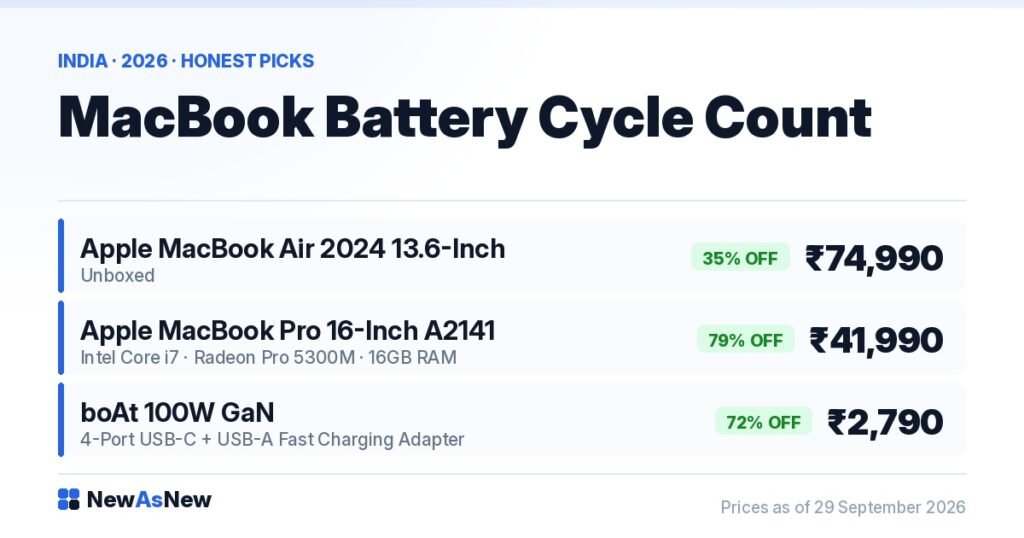
Short answer: A cycle is one full 100% discharge, however it adds up. Apple rates current MacBook batteries for 1,000 cycles while retaining up to 80% of original capacity. Under 300 cycles is excellent, 300–600 is normal mid-life, above 800 means plan a battery replacement. The Apple MacBook Air 2024 M3 Unboxed at ₹74,990 on NewAsNew carries negligible cycles because it was never really used. Always ask for the number before you pay.
Prices are live as of 29 September 2026 and move with stock — check the linked product page for today’s exact price.
What is a charge cycle, exactly?
One cycle means you have used 100% of the battery’s capacity — not necessarily in one sitting.
Use 60% today, charge to full, use 40% tomorrow: that is one cycle, counted after the second day. Plug and unplug fifteen times in a day while barely draining anything and you may add a fraction of a cycle. This is why cycle count is a far better wear measure than “how many times did I charge it”.
Apple’s published design target for current Mac notebooks is 1,000 cycles while retaining up to 80% of original capacity. That is a specification, not a cliff. A battery at 1,000 cycles does not stop; it just holds less, and macOS starts telling you so.
What cycle count is actually acceptable when buying used?
Here is how we read the number in our own workshop before a MacBook is allowed onto the site.
| Cycle count | What it means | What we do with it |
|---|---|---|
| 0–50 | Effectively unused. Typical of Unboxed stock. | List as Unboxed. Battery is a non-issue. |
| 50–300 | Light to moderate use, roughly one to two years of normal life. | Good. Expect near-full runtime. |
| 300–600 | Normal mid-life. Runtime noticeably below new but usable all day for light work. | Acceptable if condition is Normal. We disclose the number. |
| 600–800 | Late life. You will feel it — plan around a socket. | Only listed with the number stated and priced accordingly. |
| Above 800, or status not Normal | Battery is near or past its rated life. | Battery replaced before listing, or the unit is rejected. |
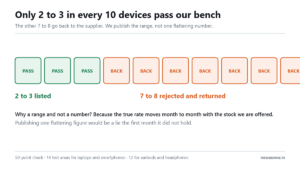
Most of what we inspect never reaches the site at all. We wrote about that in what happens to the 7 or 8 devices in 10 that we reject.
How do I check cycle count on a MacBook in 30 seconds?

Two ways. Do this in front of the seller, before any payment.
Method 1 — System Settings. Apple menu, System Settings, Battery, then click the small information button beside Battery Health. You see cycle count and a condition status.
Method 2 — System Information. Hold the Option key, click the Apple menu, choose System Information, then Power in the left column. Under Battery Information you get Cycle Count, Condition, Full Charge Capacity and Design Capacity. This view also proves nothing has been spoofed by an app.
Condition should read Normal. If it reads Service Recommended, Replace Soon or Service Battery, the battery is a cost you are inheriting. Walk away or get the price reduced by the cost of a genuine replacement.
The same discipline applies to Windows laptops, where the tool is a battery report instead. We cover it in how to check laptop battery health in 60 seconds before you buy.
Cycle count or age — which matters more?
Both, and people fixate on the wrong one.
Lithium cells degrade calendar-wise even when unused, driven mainly by heat and by sitting at 100% charge. A 2019 MacBook Pro with 120 cycles that spent six years plugged in at a desk in Chennai can hold less charge than a 2022 machine with 400 cycles that was cycled properly in an air-conditioned office.
So read three numbers together: cycle count, condition status, and full charge capacity as a percentage of design capacity. If full charge capacity is around 85% or better of design and condition is Normal, the battery is genuinely healthy regardless of what the cycle number suggests.
Our companion piece, laptop battery health explained: what 80% actually means day to day, translates those percentages into hours of real use.
What this means for the two MacBooks we have in stock
| Unit | Live price | Battery expectation |
|---|---|---|
| Apple MacBook Air 2024 13.6″ M3, 8GB/256GB (Unboxed) | ₹74,990 (35% off ₹1,14,990) | Negligible cycles. A 2024 cell with years of life ahead, and the M3’s efficiency means fewer cycles per year of ownership. |
| Apple MacBook Pro 16″ A2141 Intel Core i7, 16GB/512GB | ₹41,990 (79% off ₹1,99,900) | A pre-owned 2019-generation machine. Expect real cycles and 4–6 hours of mixed-use runtime. Ask us for this specific unit’s number before you order — we will send you the reading. |
That second row is the honest part. An Intel 16-inch MacBook Pro was never a long-battery laptop even when new, and a six-year-old cell does not improve it. If you plan to work unplugged all day, the Air is the machine; if you work at a desk, the Pro’s battery matters far less than its 16GB and dedicated GPU.
How to make a MacBook battery last longer in Indian conditions

Heat is the enemy, and India supplies plenty of it.
Leave Optimised Battery Charging on. Do not work with the machine on a bed or sofa cushion — blocked vents on an Intel MacBook Pro cook the cell sitting right beside them. Avoid leaving it at 100% on charge for weeks; if it lives on a desk, let it drop and rise. Do not run it in a closed car in May.
Keep a second charger so you are never tempted by a cheap unregulated one. A boAt 100W GaN 4-port USB-C charger at ₹2,790 (72% off ₹9,999) handles a 16-inch MacBook Pro plus a phone from one socket, which is useful on Indian trains where sockets are scarce.
More habits that genuinely add years: how to extend the life of your laptop by 3 years.
Who should NOT buy on cycle count alone
Do not use cycle count as your only filter, and do not buy at all in these cases:
If the seller will not show you the number. It takes 30 seconds to display. Refusal is the answer. Do not buy.
If you are choosing a machine purely because it has the lowest cycles. A 2018 MacBook with 40 cycles is still a 2018 MacBook with an ageing platform and an ageing cell. Software support matters more than battery wear over a five-year hold.
If you need eight hours unplugged and are eyeing an Intel MacBook Pro. Even a fresh battery in that chassis will not do it. Buy Apple Silicon, or buy a modern Windows ultrabook such as the 11th Gen options under ₹45,000.
If a “battery replaced” claim comes with no invoice. A non-genuine cell can report a fake cycle count and, worse, swell. Ask for the service record.
If the condition status is anything but Normal and the price has not been reduced for it. You are paying full price for a job you will pay for again.
Frequently asked questions
How many cycles does a MacBook battery last?
Apple rates current MacBook batteries for 1,000 cycles while retaining up to 80% of original capacity. Beyond that they keep working with reduced runtime. Most normal users take three to five years to reach 1,000 cycles.
Is 500 cycles bad on a used MacBook?
No, it is mid-life. If the condition reads Normal and full charge capacity is around 85% or more of design capacity, 500 cycles is perfectly reasonable — provided the price reflects a used machine rather than a nearly-new one.
Can cycle count be reset or faked?
The count lives in the battery’s own controller, so it cannot simply be reset in software. It does reset if the battery is physically replaced — which is why a low cycle count on an old machine should prompt one question: was the battery replaced, and with a genuine cell?
Do unboxed MacBooks have zero cycles?
Usually very close to zero. Factory testing and setup put a handful of cycles on any machine, so single-digit or low double-digit counts are normal and not a warning sign.
Does the NewAsNew warranty cover the battery?
Batteries are consumable parts, so coverage differs from covering a logic board. Read the specifics in our warranty explainer before you order, and ask us on WhatsApp if anything is unclear.
What does it cost to replace a MacBook battery in India?
It varies a lot by model and service route, and we will not quote a number we have not verified for your machine. Get a written quote from Apple or an authorised service provider for your exact model before buying a unit with a weak battery — that quote is part of the true price.
Is cycle count the same idea as iPhone battery health percentage?
They measure the same wear from different angles. iPhones show a maximum capacity percentage; Macs show cycles plus capacity. Our piece on acceptable refurbished iPhone battery health explains the phone side.
Should I keep my MacBook plugged in all day?
Occasionally, yes — that is what Optimised Battery Charging manages. Permanently at 100% in a hot room is the worst case for calendar ageing. Let it cycle sometimes.
Where to go next
Browse more: MacBook buying guide: new, unboxed or Grade A in 2026 · how our 50-point quality check works · 15 questions to ask before buying any refurbished laptop · how to buy a refurbished laptop without getting cheated.
Want the exact cycle count and battery condition reading for a specific unit before you order? Ask on WhatsApp at +91 79822 35917 and we will send you the screenshot from that machine.
Written by the NewAsNew team, NextG Serve Pvt. Ltd., New Delhi. We log cycle count, condition and full charge capacity for every MacBook during our 50-point check, and we replace or reject weak cells rather than list them quietly. Prices here were read live from our store on 29 September 2026. Read our story.