Airpods & Earbuds (Unboxed)
  Camera & Lenses (Unboxed)
  Headphones (Unboxed)
  Laptops (Unboxed)
  MacBooks (Unboxed)
  Mobile Accessories (Unboxed)
  Monitors (Unboxed)
  Wearables (Unboxed)
  Laptops (Grade A)
  Monitors (Grade A)
  Smartphone (Grade A)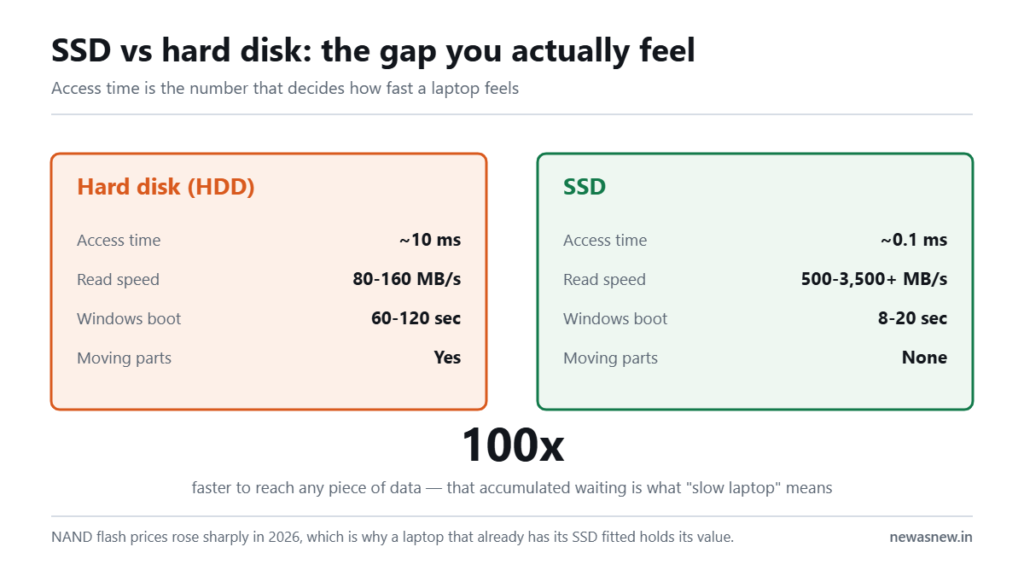
Short answer: A SATA SSD reads at up to about 550 MB/s; an NVMe SSD reads at 3,500 MB/s or more. That sounds decisive and mostly is not — for documents, browsing and office work you will barely notice, because both have the same near-instant access time. NVMe matters if you move large files daily: video, big datasets, virtual machine images. Most 10th and 11th Gen business laptops such as the HP EliteBook 840 G8 at Rs 32,990 already ship with NVMe.
Prices are live as of 6 September 2026 and move with stock — check the linked product page for the current figure before you decide.
What is the actual difference?
Both store data on the same kind of flash chips. What differs is the road the data travels on.
SATA is a connection standard designed in the era of mechanical hard disks. It was never built for flash and its ceiling is around 600 MB/s. An SSD on SATA is a fast device on a slow road.
NVMe connects directly over PCIe lanes to the processor. It was designed for flash from the start, and it handles many simultaneous requests in parallel rather than queueing them.
| SATA SSD | NVMe SSD | |
|---|---|---|
| Sequential read | Up to ~550 MB/s | 3,500-7,000+ MB/s |
| Connection | SATA III, 6 Gb/s | PCIe lanes, direct to CPU |
| Command queues | 1 queue, 32 commands | Up to 65,535 queues |
| Physical form | 2.5-inch bay or M.2 | M.2 only |
| Windows boot | 15-20 seconds | 8-12 seconds |
| Heat | Cool | Warmer under sustained load |
Where will you actually feel it?
You will feel it copying a 20GB video file, importing a large photo library, loading big project files, running virtual machines, or exporting video. Anything that moves a lot of data in one go.
You will barely feel it booting Windows, opening Chrome, working in Excel and Tally, or launching Word. These are small scattered reads, and both drive types answer them in a fraction of a millisecond. The bottleneck is the CPU and RAM, not the drive.
This is the honest version that shop staff rarely give: the enormous upgrade is HDD to any SSD. SATA to NVMe is a refinement.
Beware the M.2 confusion
M.2 is a shape, not a speed. An M.2 slot can hold either a SATA SSD or an NVMe SSD, and they look nearly identical. The give-away is the notch: SATA M.2 drives have two notches (B+M key), NVMe drives usually have one (M key).
This matters if you upgrade. Some laptops have an M.2 slot that only supports SATA. Fitting an NVMe drive into it will either not work or will run at SATA speed. Check the service manual for your exact model before buying a drive.
How do I check what my laptop has?
Windows 11: Ctrl+Shift+Esc, Performance tab, Disk. The disk type is shown as SSD or HDD. For the connection, open Device Manager and expand Disk drives — an NVMe drive normally has NVMe in its model name.
The free tool CrystalDiskInfo shows it unambiguously, along with the drive’s remaining health and total data written. That last number is worth checking on any second-hand purchase.
Does this matter more in 2026?
It matters differently. With NAND flash prices reported up 85-90% in the first quarter of 2026, the price gap between drive capacities widened. A laptop that already ships with a 512GB NVMe drive is carrying a component that costs meaningfully more to buy separately today than it did two years ago. That is a quiet part of why buying a complete refurbished machine has held its value advantage this year.
Who should NOT pay extra for NVMe
- Students and office users. Put the money into capacity. A 512GB SATA SSD serves you better than a 256GB NVMe.
- Anyone upgrading from a hard disk. Either drive will feel transformative. Buy on price and size.
- Anyone with a laptop that only supports SATA M.2. The slot decides. Check first.
Do insist on NVMe if you edit video, work with large RAW photo sets, run virtual machines, or regularly move tens of gigabytes.
What we can ship today
Every unit below is in stock as this page was last checked, with a 6-month NewAsNew Assured Warranty, GST invoice, 7-day returns and no-cost EMI. If it is listed here, we can dispatch it.
| Model | Price | MRP | You save |
|---|---|---|---|
| Dell Latitude 7490 Intel Core i5 8th Gen Laptop · Business Series |
₹22,490 | ₹88,999 | 75% |
| Dell Latitude 5400 Core i7 8th Gen Laptop · Business Series |
₹25,990 | ₹79,999 | 68% |
| Dell Latitude 5310 2-in-1 Core i5 10th Gen Laptop · 360° Convertible · Business Series |
₹39,990 | ₹89,000 | 55% |
| Dell Precision 3551 Core i7 10th Gen Laptop · 4GB Graphics · Mobile Workstation |
₹54,990 | ₹149,999 | 63% |
Prices checked on 29 September 2026 — stock and prices move, so the linked product page is always the truth.
Browse all laptops in stock · Ask us on WhatsApp which one fits you
Frequently asked questions
Is NVMe worth it over SATA for normal use?
For documents, browsing and office work, the difference is small because both have near-identical access times. It becomes worthwhile when you routinely move large files.
Can I put an NVMe SSD in any laptop with an M.2 slot?
No. Some M.2 slots are SATA-only. Check your model’s service manual or ask the seller. An NVMe drive in a SATA-only slot will not deliver NVMe speed and may not be detected at all.
Which do NewAsNew laptops use?
It varies by model and generation. Most 10th and 11th Gen units — the HP EliteBook 830 G8, 840 G8 and Dell Latitude 5320 and 5421 — use NVMe. Some 8th Gen Latitudes use SATA M.2. Storage type is recorded during our 50-point check; ask on WhatsApp for the specific unit.
Does NVMe drain more battery?
Slightly more under heavy sustained transfers, and slightly less at idle on modern drives. In normal daily use the difference is not meaningful.
Do NVMe SSDs fail faster because they run hotter?
Consumer NVMe drives in laptops throttle rather than fail when hot, and endurance ratings are similar to SATA drives. Both will normally outlast the laptop.
Is 512GB NVMe better than 1TB SATA?
For most people, the 1TB SATA. Running out of space is a daily problem; the extra sequential speed is not.
Related guides
- Best refurbished laptops in India 2026, by budget
- Intel Core i5 vs i7 in refurbished laptops
- 8th vs 10th vs 11th Gen: the real-world difference
- Why laptop prices are rising in India in 2026
Still deciding? Talk to a human
Send us the work you do and your budget on WhatsApp and we will tell you honestly whether we have something for you — or whether you should wait. Chat with NewAsNew on WhatsApp (+91 79822 35917).
Browse live stock: Grade A Certified laptops · Refurbished iPhones · Unboxed headphones · Unboxed earbuds.
Written by Atul Pandey, co-founder of NewAsNew (NextG Serve Private Limited, New Delhi). We came from four years of offline electronics retail in Prayagraj before building NewAsNew. Only 2 to 3 out of every 10 devices that reach our QC bench pass; the other 7 to 8 go back to the supplier. The exact figure moves month to month with the stock we are offered, so we publish the range rather than one flattering number. Read our story.