Airpods & Earbuds (Unboxed)
  Camera & Lenses (Unboxed)
  Headphones (Unboxed)
  Laptops (Unboxed)
  MacBooks (Unboxed)
  Mobile Accessories (Unboxed)
  Monitors (Unboxed)
  Wearables (Unboxed)
  Laptops (Grade A)
  Monitors (Grade A)
  Smartphone (Grade A)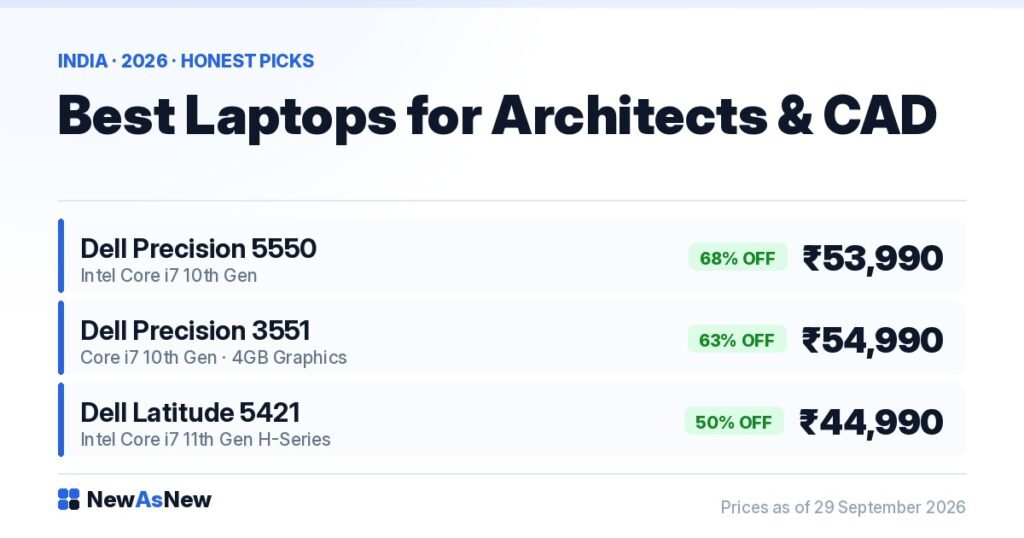
Short answer: Only two laptops in our current stock are genuinely CAD-capable: the Dell Precision 5550 at ₹53,990 (68% off ₹1,69,999) and the Dell Precision 3551 at ₹54,990, both 15.6-inch mobile workstations with 4GB dedicated graphics. Everything cheaper we stock has integrated graphics — fine for 2D AutoCAD drafting, wrong for Revit. If your work is Lumion or Enscape rendering, buy new instead; we will say so rather than sell you the wrong machine. Warranty, 7-day returns and a GST invoice on every order.
Prices are live as of 29 September 2026 and move with stock — check the linked product page for today’s exact price.
Why most refurbished laptop lists are useless for architects
Almost every “best refurbished laptop” list in India is a list of ex-corporate ultrabooks. Those machines were bought by banks and IT companies for email, Excel and Teams. They are excellent at that. They were never specified for drafting, modelling or rendering, and no discount changes that.
So before any recommendation, here is the honest inventory position. Of the fourteen laptops we have in stock today, twelve have Intel integrated graphics. Two are mobile workstations with 4GB dedicated GPUs. If your work is Revit, 3ds Max, Lumion, Enscape or Twinmotion, only those two are in the conversation — and for the heaviest of that list, even they are a compromise. We would rather tell you that now than after your first Revit central model takes forty seconds to open a view.
What does AutoCAD actually demand from a laptop?
AutoCAD is the software architects most commonly misjudge. For 2D drafting it is a single-thread workload. It cares about how fast one CPU core runs, not how many cores you have, and it does not meaningfully use a dedicated GPU for 2D work. A 14-inch business laptop with a modern quad-core i5 and an SSD will draft plans, sections and details without complaint.
That changes the moment you switch AutoCAD to 3D modelling with visual styles, or move to Revit. Revit is a different animal: large central models, worksharing, linked consultants’ files, and a viewport that genuinely uses the GPU. Revit also eats RAM in a way 2D drafting never does. Autodesk’s own guidance for Revit has been a dedicated GPU and 16GB as a floor, with 32GB for larger projects, for several years now.
Rendering is a third category again. Lumion, Enscape, V-Ray and Twinmotion are GPU-bound and VRAM-bound. This is where refurbished business hardware from 2019 and 2020 hits a wall that no price can argue with.
| Workload | What it actually needs | Can our in-stock machines do it? |
|---|---|---|
| 2D AutoCAD drafting | Fast single-core clock, SSD, 16GB | Yes — an i7 business laptop is genuinely fine |
| SketchUp modelling (no render) | Single-core clock, modest GPU | Yes on the Precisions; workable on an 11th Gen i7 |
| Revit — small residential models | Dedicated GPU, 16GB minimum | Only on the Precision 5550 or 3551 |
| Revit — large or linked commercial models | Dedicated GPU, 32GB, fast storage | Marginal even on a Precision. Plan for 32GB |
| Lumion, Enscape, Twinmotion, V-Ray | Current-generation RTX GPU, 8GB+ VRAM | No. Buy new or render on a desktop |
| 3ds Max animation | High core count plus strong GPU | No. This is desktop work |
Which in-stock laptops can an architect actually buy?
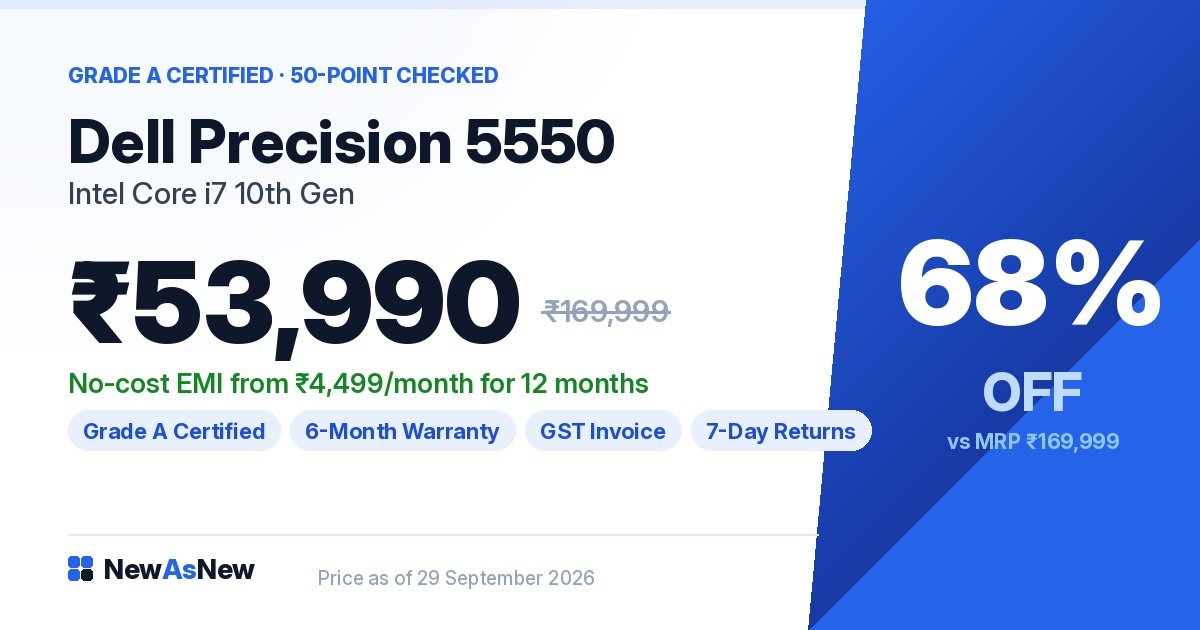
Dell Precision 5550 Core i7 10th Gen, 4GB dedicated graphics — ₹53,990 (MRP ₹1,69,999, 68% off). This is the one we would buy ourselves. It is a 15.6-inch mobile workstation built on the compact XPS-style chassis, so it is far more portable than most workstations — which matters if you carry drawings between a studio, a client meeting and a site. The 4GB professional GPU is the reason it can open a Revit model at all. Confirm the exact GPU variant and the RAM fitted on the unit in stock from the listing or on WhatsApp before you order, because these machines were sold in several configurations.
Dell Precision 3551 Core i7 10th Gen, 4GB graphics — ₹54,990 (MRP ₹1,49,999, 63% off). The same GPU class in a thicker, more serviceable body. Thicker is not a flaw here — more chassis volume means a bigger cooling system, and CAD work is sustained load, not bursts. If the machine lives on a desk 90% of the time and you value easy RAM and SSD access over thinness, this is the better buy of the two. Our Precision 3551 vs 5550 comparison works through that choice properly.

Dell Latitude 5421 Core i7 11th Gen H-Series — ₹44,990 (MRP ₹89,999, 50% off). Buy this only if your answer to “do you use Revit?” is no. It has integrated graphics. What it does have is an H-series processor — a 45W-class chip rather than the 15W ultrabook parts in our cheaper laptops — which means higher sustained clock speeds, and that is exactly the metric 2D AutoCAD rewards. For a drafting-heavy junior architect, a PMC engineer reviewing drawings, or an interior designer working mostly in AutoCAD and SketchUp, this is ₹9,000 cheaper than the Precision 5550 and better value. Our guide to U, P and H series Intel chips explains why that letter matters more than the number.
One more machine deserves a mention, with a warning. The Apple MacBook Pro 16-inch A2141 with Radeon Pro 5300M 4GB and 16GB RAM — ₹41,990 (MRP ₹1,99,900, 79% off) has a dedicated GPU, 16GB of RAM and one of the best screens you will find at this price. AutoCAD for Mac exists. Revit does not run on macOS. There is no Mac version, and running it in a virtual machine on an Intel Mac is not a setup we would recommend to someone who bills by the hour. If you are Revit-dependent, this is the wrong machine no matter how good the screen is.
Does the screen matter more for architects than for other buyers?
Yes, and it is the spec most people ignore. Architectural drawings are dense: hatches, dimension strings, layer colours, small text. A dim, low-contrast panel makes you zoom constantly, and zooming constantly is how drafting hours disappear.
Check two things on any unit: resolution and brightness. A 15.6-inch screen at full HD is workable; the same panel at QHD or better shows more of the drawing at once, which is the real productivity gain. Brightness above roughly 300 nits matters if you ever work near a window or on site. Our laptop screen specs guide explains nits and sRGB in plain terms.
The bigger truth: almost every architect ends up on an external monitor. Budget for that monitor from day one rather than paying a premium for a slightly better laptop panel.
How much RAM does CAD work really need in 2026?
For 2D AutoCAD, 16GB. For Revit, 16GB is the floor and 32GB is what you will want within a year if your projects grow. This is the single most common reason an architect’s laptop feels slow, and it is not the processor’s fault.
Both Precisions take RAM upgrades. But 2026 is a bad year to be relaxed about this — RAM and SSD prices have risen sharply, which we cover in why laptop prices are rising in India. Confirm what is fitted before you buy rather than assuming a cheap upgrade later. Our upgrade yourself vs buy higher spec guide has the current maths.
Who should NOT buy a refurbished laptop for CAD work
Anyone doing real-time rendering or visualisation. If Lumion, Enscape or Twinmotion is how you win clients, do not buy a 2020 mobile workstation. You need a current RTX GPU with more VRAM. Buy new, or build a desktop and remote into it. We will lose this sale and say so plainly.
Anyone doing 3ds Max animation or large V-Ray batches. Laptop rendering at any price in this range is false economy. A desktop gives you more GPU for the same money and does not cook itself.
Architects who want a thin, light machine and Revit. Those two requirements do not meet in refurbished stock. The genuinely light laptops we sell all have integrated graphics. Pick one constraint.
Students on a strict ₹25,000 budget whose syllabus includes Revit. An ₹22,000 ultrabook will run AutoCAD and disappoint you in Revit. Either wait and save for a Precision, or accept that you will do studio Revit work on the college lab machines. Both are honest answers. Buying the cheap laptop and hoping is not.
Anyone who cannot confirm the GPU and RAM on the specific unit. Ask us. If we cannot confirm it, do not order it.
Frequently asked questions
Can a refurbished laptop run AutoCAD in India?
Yes. 2D AutoCAD runs well on any of our i7 business laptops, including the Latitude 5421 at ₹44,990, because it depends on single-core clock speed and an SSD rather than a dedicated GPU.
Which refurbished laptop is best for Revit?
The Dell Precision 5550 at ₹53,990 or the Dell Precision 3551 at ₹54,990. They are the only in-stock machines with 4GB dedicated graphics. For large linked commercial models, plan on 32GB of RAM.
Do I need a dedicated graphics card for architecture software?
For 2D drafting, no. For Revit, SketchUp with heavy extensions, and anything that renders, yes. Our integrated vs dedicated graphics guide draws the line with examples.
Is a Precision mobile workstation worth ₹54,990 over a ₹25,000 Latitude?
Only if you use GPU-dependent software. If your week is AutoCAD, PDFs, Excel and email, the Latitude is the correct purchase and the Precision is ₹30,000 wasted.
Can I run Revit on a refurbished MacBook Pro?
No. Revit has no macOS version. The MacBook Pro 16-inch at ₹41,990 is a fine AutoCAD and rendering-adjacent machine for Mac-based studios, but it cannot run Revit natively.
How much RAM do I need for AutoCAD and Revit?
16GB for both as a minimum; 32GB for Revit projects with linked consultant models. See how much RAM you actually need in 2026.
Will a 10th Gen processor feel outdated for CAD in 2026?
For CAD, generation matters less than sustained clock and cooling — which is why a 2020 workstation still drafts well. Our 8th vs 10th vs 11th Gen comparison shows what actually changes in real use.
Does a refurbished workstation come with a warranty and GST invoice?
Yes — NewAsNew Assured warranty, 7-day returns and a GST invoice on every order, which a practice can claim input credit against. Details in our warranty guide.
Browse more: best refurbished laptops under ₹50,000 · video editing picks under ₹50,000 · what a business-series laptop actually is · 15 questions to ask before buying any refurbished laptop.
Tell us your actual software list. Send it on WhatsApp — chat with us at +91 79822 35917 — with the software you use weekly and your typical model size. If the honest answer is that you should buy a new machine or a desktop, that is what we will tell you.
Written by the NewAsNew team. Every unit is inspected on our own bench in New Delhi against a 50-point check before listing, and roughly 7 or 8 of every 10 machines we assess are rejected rather than sold. Read our story.